
Muglobe:How to use MuGlobe: Difference between revisions
Publish Ed Brakus’s MuGlobe user guide, adapted from his explainer, and link it from the wiki home page. |
Rewrite the guide as a concise navigation-first walkthrough with before-and-after globe dragging images |
||
| (One intermediate revision by the same user not shown) | |||
| Line 1: | Line 1: | ||
''' | __NOTOC__ | ||
'''Pick a place on the globe and listen to its music.''' Move somewhere else to hear a different mix, or stay and enjoy the songs. You can explore without an account. | |||
[https://muglobe.com Open MuGlobe and | [https://muglobe.com Open MuGlobe], then follow these steps: | ||
* [[#Move the globe|Move the globe — find a place to explore.]] | |||
* [[#Listen to that place|Listen — play, pause or skip a song.]] | |||
* [[#Explore the local genres|Explore genres — see the local styles and choose what you hear.]] | |||
* [[#Try another channel|Try another channel — worldwide radio or your saved music.]] | |||
* [[#Learn about the music|Read more — discover the music and its communities.]] | |||
== | == Move the globe == | ||
Start with '''mix radio''' showing above the song details. If another channel is selected, use the arrows beside its name to return to mix radio. | |||
The '''small unlettered circle beneath the white (i)''' marks your listening location. Move the world beneath that circle: | |||
# Point at an open area of the globe, away from buttons. | |||
# '''Hold the left mouse button down and move the mouse.''' Drag left, right, up or down to turn the globe. | |||
# '''Release the button''' to stop. Repeat with short drags until the place you want is under the circle. | |||
# '''Zoom in''' for a closer look or '''zoom out''' to find another part of the world. Use the '''+ / −''' buttons at the upper right, or scroll your mouse wheel over the globe. | |||
On a phone or tablet, drag with one finger and pinch with two fingers to zoom. | |||
<gallery mode="packed" heights="280" caption="The globe moves; the listening circle stays in the same place."> | |||
File:MuGlobe-guide-drag-before-20261030.jpg|alt=Globe before dragging, with western Canada under the center circle and zoom buttons at the upper right.|Before: the circle is over western Canada. | |||
File:MuGlobe-guide-drag-after-20261030.jpg|alt=Globe after upward and leftward drags, with northern Mexico under the circle in the same screen position.|After dragging up, then left: northern Mexico is under the same circle. | |||
</gallery> | |||
== | == Listen to that place == | ||
Stop with the circle '''over land'''. MuGlobe puts together a local mix and shows the region, musical style, artist and song. Press '''Play''' if music has not started. | |||
[[File:MuGlobe-guide-playback-20261030.jpg|thumb|none|364px|alt=Song details above pause, next, speaker and volume controls.|Below the song: Play/Pause, Next, then sound and volume.]] | |||
Use '''Pause''' to take a break, '''Next''' to skip a song, and the '''volume slider''' to adjust the sound. Stay in one place to keep listening, or drag the globe to hear somewhere new. | |||
== Explore the local genres == | |||
'''Genres are styles of music.''' Click the '''(i) beside the listening circle''' to open the local genre list. Its percentages show the styles' relative influence in that place. | |||
The colored areas called '''mushrooms''' show where those styles have musical influence. Each genre has a matching colored square in the list. | |||
[[File:MuGlobe-guide-genre-switches-20261030.jpg|thumb|none|308px|alt=Genre list with a colored square beside each style; Folk rock is switched off.|Click a square to turn a genre on or off. Click its name to read about it.]] | |||
'''The square controls both the map and Radio Mix:''' turn it off to hide that genre's mushrooms and leave it out of upcoming songs. Turn it on to include it again. The current song can finish; press '''Next''' to change now. | |||
Your choices stay with you as you move around in the same listening tab. '''All genres''' restores them all. If you turn every local genre off, choose one again to continue listening. These choices do not filter the other channels below. | |||
== | == Try another channel == | ||
The | The '''station selector''' above the song details chooses your listening channel. Use its '''left and right arrows'''; the name between them is the current channel. | ||
MuGlobe | [[File:MuGlobe-guide-station-liked-20261030.jpg|thumb|none|279px|alt=Heart button beside the channel name and left and right arrows.|Arrows change the channel. The heart saves a song.]] | ||
[https://muglobe.com Return to the globe] | * '''mix radio:''' you move the globe, and the music follows the place you choose. | ||
* '''Radio MuGlobe:''' a curated worldwide selection. The globe follows the music for you. You can zoom, but to drag the globe yourself, return to '''mix radio'''. [https://muglobe.com/RadioMuGlobe Listen to Radio MuGlobe]. | |||
* '''my liked music:''' your saved songs and the places where you liked them. Sign in through '''Your account''', then click the '''heart''' beside a song to save it. Click again to remove the like. | |||
Without signing in, the arrows switch directly between mix radio and Radio MuGlobe. | |||
== Learn about the music == | |||
Click a '''genre's name''' in the local list to open its wiki article. For a place's musical history, click the '''(i) on an outlined musical region'''. Regions can overlap or cross borders because music connects communities in many ways. | |||
Follow the articles' links to explore artists, instruments and related styles, or use the wiki search box. [https://muglobe.com Return to the globe] whenever you want to listen again. | |||
Latest revision as of 11:40, 30 October 2026
Pick a place on the globe and listen to its music. Move somewhere else to hear a different mix, or stay and enjoy the songs. You can explore without an account.
Open MuGlobe, then follow these steps:
- Move the globe — find a place to explore.
- Listen — play, pause or skip a song.
- Explore genres — see the local styles and choose what you hear.
- Try another channel — worldwide radio or your saved music.
- Read more — discover the music and its communities.
Move the globe
Start with mix radio showing above the song details. If another channel is selected, use the arrows beside its name to return to mix radio.
The small unlettered circle beneath the white (i) marks your listening location. Move the world beneath that circle:
- Point at an open area of the globe, away from buttons.
- Hold the left mouse button down and move the mouse. Drag left, right, up or down to turn the globe.
- Release the button to stop. Repeat with short drags until the place you want is under the circle.
- Zoom in for a closer look or zoom out to find another part of the world. Use the + / − buttons at the upper right, or scroll your mouse wheel over the globe.
On a phone or tablet, drag with one finger and pinch with two fingers to zoom.
- The globe moves; the listening circle stays in the same place.
-
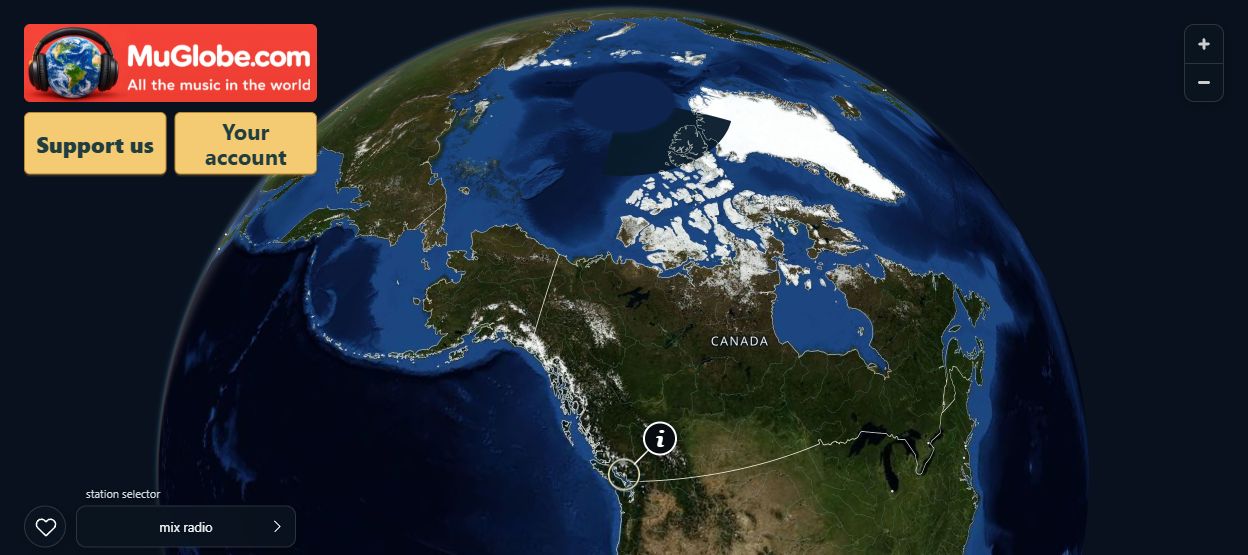 Before: the circle is over western Canada.
-
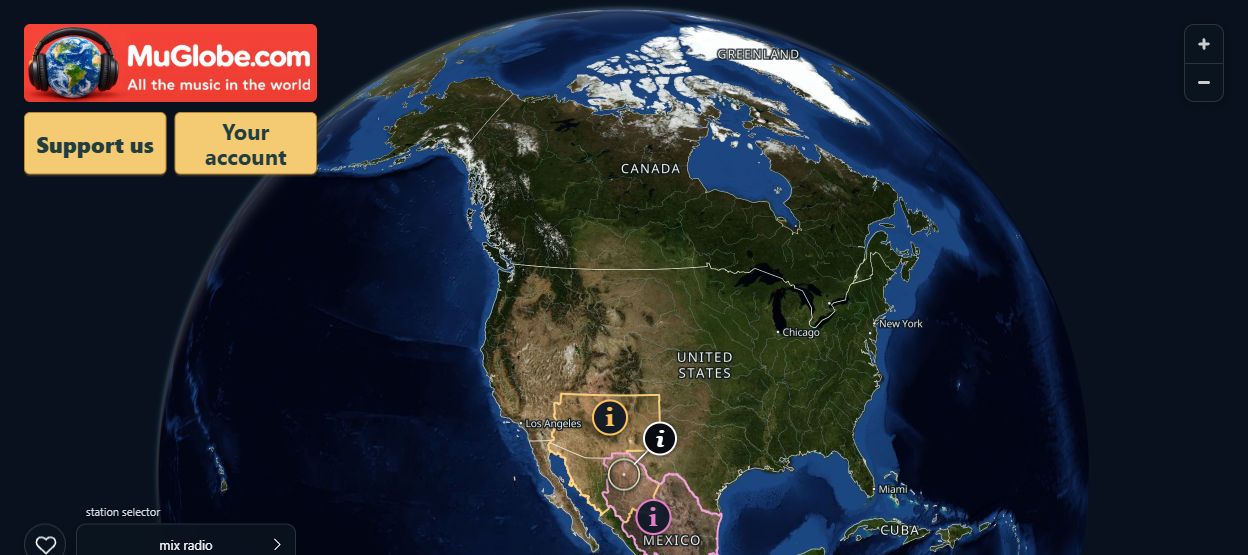 After dragging up, then left: northern Mexico is under the same circle.


Listen to that place
Stop with the circle over land. MuGlobe puts together a local mix and shows the region, musical style, artist and song. Press Play if music has not started.

Use Pause to take a break, Next to skip a song, and the volume slider to adjust the sound. Stay in one place to keep listening, or drag the globe to hear somewhere new.
Explore the local genres
Genres are styles of music. Click the (i) beside the listening circle to open the local genre list. Its percentages show the styles' relative influence in that place.
The colored areas called mushrooms show where those styles have musical influence. Each genre has a matching colored square in the list.

The square controls both the map and Radio Mix: turn it off to hide that genre's mushrooms and leave it out of upcoming songs. Turn it on to include it again. The current song can finish; press Next to change now.
Your choices stay with you as you move around in the same listening tab. All genres restores them all. If you turn every local genre off, choose one again to continue listening. These choices do not filter the other channels below.
Try another channel
The station selector above the song details chooses your listening channel. Use its left and right arrows; the name between them is the current channel.

- mix radio: you move the globe, and the music follows the place you choose.
- Radio MuGlobe: a curated worldwide selection. The globe follows the music for you. You can zoom, but to drag the globe yourself, return to mix radio. Listen to Radio MuGlobe.
- my liked music: your saved songs and the places where you liked them. Sign in through Your account, then click the heart beside a song to save it. Click again to remove the like.
Without signing in, the arrows switch directly between mix radio and Radio MuGlobe.
Learn about the music
Click a genre's name in the local list to open its wiki article. For a place's musical history, click the (i) on an outlined musical region. Regions can overlap or cross borders because music connects communities in many ways.
Follow the articles' links to explore artists, instruments and related styles, or use the wiki search box. Return to the globe whenever you want to listen again.